More from the Features Category...

Search Till You Drop! NO MORE!

Friday, June 26th, 2009

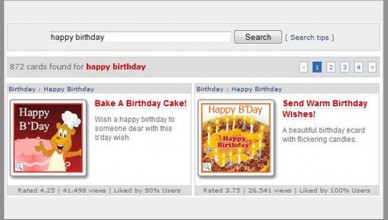
Search has been something that user’s have been using more & more on 123Greetings to find that perfect card. We’ve been also getting a lot of feedback about what user’s like and dislike about our website search.

Over the years, our search technology has been fighting to keep up with the growing traffic, and when we moved to our new web 2.0 site, we realized that it just can’t handle all the data we were now getting back from the ratings, relevancy, tags & comments that the user’s were posting while interacting with the website.

We experimented with engines like Solr, iSearch, MnogoSearch, PHPDig, RiSearch, Sphider and TSEP before settling down on Sphinx. Our focus was to provide a more relevant result set that incorporated all the user data, and at the same time was much faster than our existing search, as users have got used to fast searches… thanx to Google.

We’ve added lots of customization on top of Sphinx, to allow for common spelling errors, blocked words, ‘like search’, indexing, weighted results and what not. A key challenge was the synonym’s database that we had to custom build as we couldn’t find anything else that was close to our requirements.


Looking at our access logs, we also saw that lots of users were typing in their e-card numbers in the search box trying to view the card that they received, so we made the new search box a single window for both search and e-card view!

As always, your feedback remains as our greatest inspiration to inspect, innovate and improve. Therefore, your inputs in the small box called “Feedback” remains the “most discussed” agenda for us everyday @ 123Greetings.com!

Cheers!

123Greetings 2.0 - Designed Especially for You!

Thursday, August 21st, 2008

When we thought of revamping 123Greetings, the first thought was of our users. It was the ultimate design challenge: how can we make 123Greetings to be user friendly and highlight our 20,000+ ecards at the same time? The old 123Greetings site had a lot of clutter, and too many things going on at the same time. Visitors were not able to find the right ecard because we just have, well, a lot of ecards!

That’s why we’ve cleared away the clutter and taken out background images and anything else that has nothing to do with ecards and the ecard-sending process. We’ve put the mantle in every category so you can find the sub-category that you want faster. We’ve reorganized our categories and put them on the top level navigation bar, which freed the space for the layout. We’ve added the user friendly ajax boxes to showcase the most viewed, highest rated, most popular, and the latest additions to our ecard collection.

You can even see what’s most viewed and most popular in the category pages as well. You’re able to view the thumbs of ecards as well as the preview of the ecards. With the new design, you can send the message across to your loved ones faster instead of wading through ecards that might not be right for you or the occasion.

Ecard Preview

123Greetings 2.0 — We’ve Incorporated Your Feedback

Friday, August 8th, 2008

First off, a big shout-out to those who took the time to give us feedback. We wouldn’t be able to come up with the new 123Greetings without you. We’ve incorporated all your concerns in the new 123Greetings site.

Pop-up ads are gone!

That’s right, we have a brand new ad serving system that doesn’t include pop-ups. Even when you visit now you won’t find pop-ups on our site. They’re a thing of the past. We’ve managed to keep the site free while giving our sponsors a space for their advertising. New advertisers have signed on, so you’re going to see better quality ads. Without pop-ups you’ll be having a better ecard-sending experience.

One off real time unsubscribe

We’ve always been CAN-SPAM compliant. We’ve always encouraged the best practices in protecting our users’ privacy. We’ve always ensured that your email address is safe and secure. Add to that is our new real time unsubscribe service. When you want to unsubscribe from our newsletter, offers, and updates, you can do so in real time. It’s faster than what is specified in the CAN-SPAM Act. We’re taking extra steps so that you can have a pleasant experience with our service.

Go Green

We at 123Greetings feel that as citizens of planet Earth, we have a moral obligation to save the environment. We also believe that if deforestation is brought under control, most of the other causes of global warming will be taken care of — be it ecosystem imbalance or greenhouse effect. Therefore, all the measures that should be taken to stop global warming, boils down to “Going Green”. We’re taking steps to ensure that conservation and recycling is part of our design and infrastructure.

Keeping these points in mind we would still need your feedback. We’d love to get your input for our beta launch so that we can provide the best ecard sending service. We are about to launch the 123Greetings 2.0 beta site.

Stay tuned!

123Greetings 2.0 – A Sneak Peek!

Thursday, August 7th, 2008

All of our features for 123Greetings 2.0 are redesigned with our users like you at the center. Here are just a couple of features to whet your appetite.

Navigation

The navigation bar now gives you a better, faster way of finding the ecards. You will be able to navigate to any of the categories from anywhere on the site. A listing of the sub categories neatly comes on the 2nd row, allowing you to locate your ecard in a jiffy.

Navigation

Rating

The brand new rating system allows you to rate a card with 5 stars (outstanding) to 1 star (somewhat) based on your experience. Our rating engine then calculates the average rating for every card and presents the best ecards to the users based on various algorithms running in the background.

Rating

Relevancy

We’ve added a cool way to improve the relevancy of the cards you see in search results and on the pages; You have the option of giving a thumbs up or thumbs down to any of the cards. This helps in getting you the right ecard for the right person, at the right occasion.

Relevancy

Tags

You can make use of tags to find ecards easier and faster. Once you’ve found your favorite ecard, you can tag it so you don’t have to find it all over again. Use tags to locate ecards that are most relevant to you.

Tags

Preview

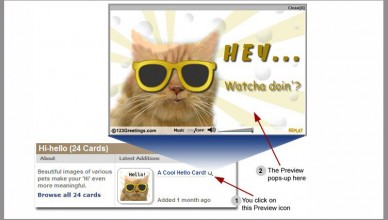
The preview feature lets you preview the ecard in a faster way on the spot. This allows you to scan through a larger selection of ecards before deciding which ecard to send.

Preview

New Cards

Get to our new ecards faster from the “Latest Additions” section. A lot of you guys wanted to see the latest ecards, this section features ecards that are hot off our drawing boards.

New Cards

Add Comments

Give us your two cents! You can add your own comment to individual ecards. Share your views with other users and become part of the 123Greetings community.

Add Comments

Mantle in Every Category

Each category page has its own mantle, helping you pin-point to the exact sub-category you want to go to.

Mantle in Every Category

New Events Calendar

And of course you can still find our wacky events and major events with our new and improved events calendar. You’ll find what’s coming up on the right hand side panel on the home page. Our expanded calendar page shows you more about the events.

New Events Calendar

Exploring More Ecards

There are a lot more ways to get to an ecard you want to send. You can always check out what’s being viewed the most and the highest rated ecards. You can send your ecards from there too!

Exploring for More Ecards

You want to get your message out fast — we want to help you do that. 123Greetings 2.0 is all about helping you express the best, in the fastest way possible while having a great experience along the way.